DesignSystemAudit
A Figma plugin that checks a file against its own design system and shows exactly what drifted.
Design systems do not break loudly. They rot: a hex typed by hand here, a 13px gap there, a heading that is almost the right size. Six months later nobody can tell which values are canon. The plugin reads the file’s own variables and styles, then reports every element that disagrees with them.
- Year
- 2026
- Role
- Design & engineering
- Type
- Figma plugin, free with no limits
- Runs
- Offline, nothing leaves the file
Theproblem
Every team has a design system and no way to enforce it. Reviewing by eye does not scale past a few frames, and the violations that matter are exactly the ones too small to notice: a colour four values off, a spacing step that does not exist in the scale, a line height pinned in pixels that will break the next time somebody changes a size.
WhatIdid
The file is its own source of truth
No config to write and no library to point at. The plugin takes the variables and styles already defined in the document as the system, walks everything under the frame you selected, and skips whatever is already bound to a variable. It works on the first run, on a file it has never seen, with nothing set up first.
Three questions, asked of every layer
Colour, on fills and strokes and text. Spacing, on padding and on the gap between things in auto layout. Typography, on font size and on line height given in pixels rather than as a share of it. Each category filters on its own, because the person fixing colours is usually not fixing spacing in the same pass.
Severity that says what to do
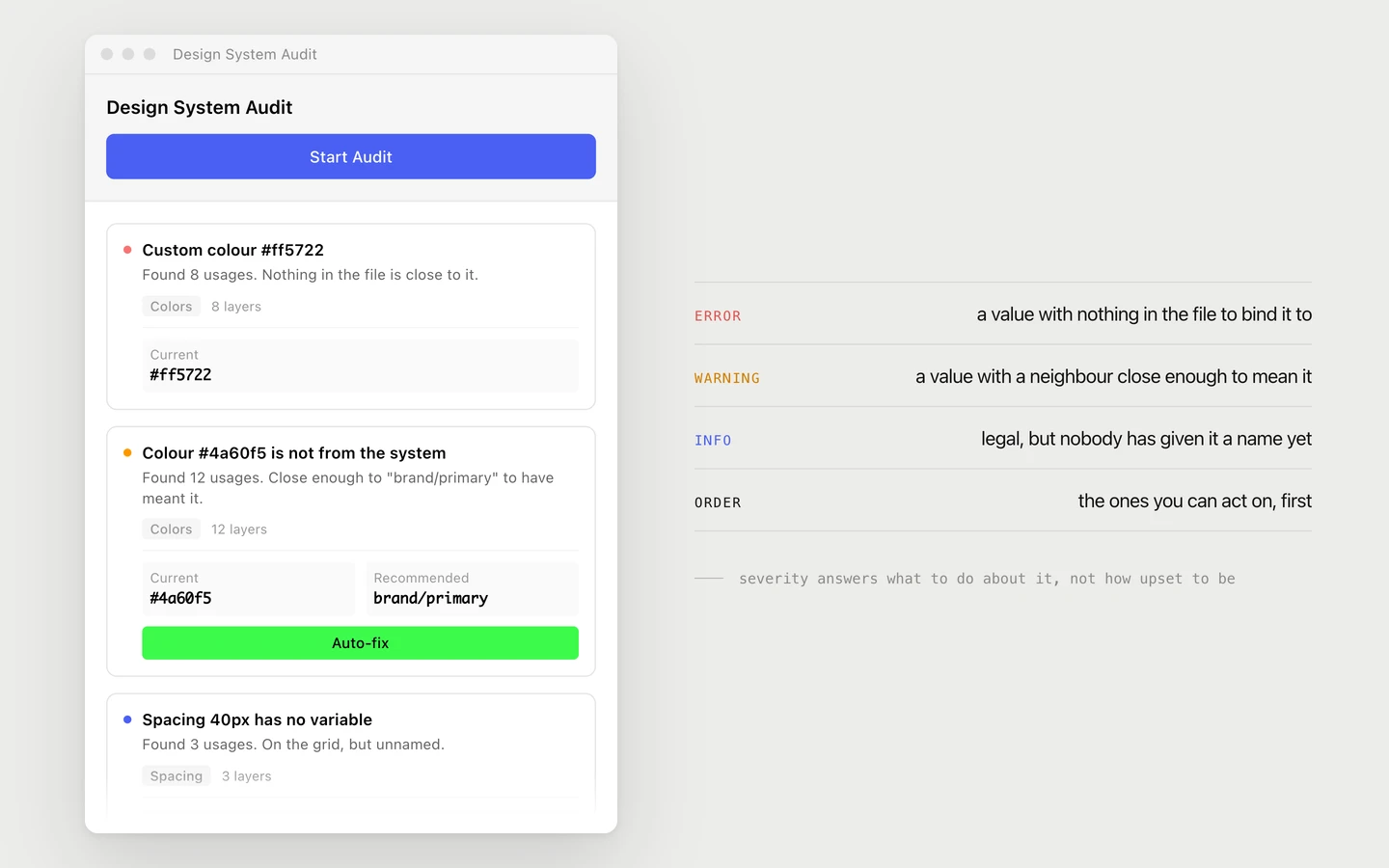
Error means the value has nothing in the file to bind it to, so somebody has to decide. Warning means there is a neighbour close enough that it was probably meant to be that all along. Info means the value is legal and simply has no name yet. The colour of the dot is not a mood, it is the answer to whether this one can be fixed without you.
The fix writes a binding, not a number
Auto-fix does not paste the hex that the variable happens to resolve to today. It binds the layer to the variable, so the next time the system changes the layer changes with it. A value that merely matches is a value that will drift again the moment somebody edits the token.
One finding is every layer that has it
A finding is a value, not a layer, and it carries every node using that value. The card says how many before you touch it, one click fixes all of them, and Mass Fix does that for every finding that has something to bind to. What it cannot answer stays on screen, because a report that ends at zero by hiding the hard ones is worse than no report.
Click a finding, land on the layer
Clicking a card selects that layer in Figma and brings it into view, wherever in the file it was. The path is on the selection, so you know which frame you have landed in. A list of problems you then have to go looking for is a second job, not a fix.
The grid is measured, not assumed
Before anything is called off-grid, the plugin looks at the spacing the file actually uses. If more than seven values in ten sit on eight, the step is eight. If not, it asks the same question about four. Only then does anything become a finding, with the nearest legal step attached. Eight pixels is a convention, and a file that never agreed to it should not be told it is wrong.
A component set drawn for 400 pixels
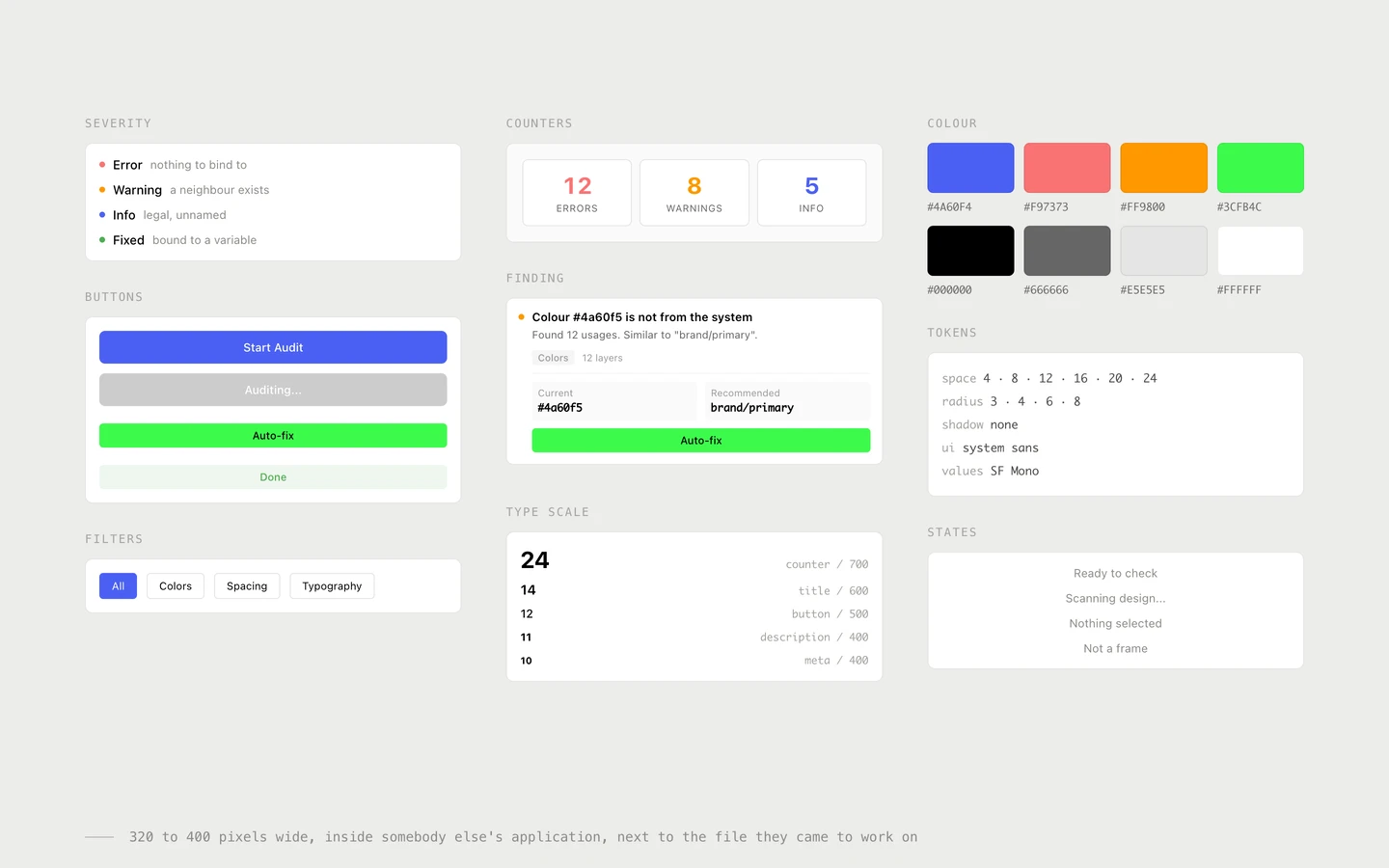
The panel is 400 by 600, inside somebody else’s application, next to the file the person actually came to work on. Nothing survives there that is not load-bearing: four severity states, one counter block, four filters, one card, two buttons, and no shadows at all. It got its own small system because a component built for a page is the wrong shape at this width.
Underthehood
Nothing leaves the file
The manifest declares no allowed domains at all, so there is no upload, no account and no telemetry, and nothing to disclose in a security review. Everything runs in the plugin sandbox against the local document. That is also what makes it usable inside companies that would never approve a cloud tool.
Similar and custom are the same question with a threshold
Every colour in use is compared to every colour variable by distance in RGB. Inside the threshold it is a near miss and the variable is offered; outside it, the nearest is still named but the finding is an error, because at that distance the plugin is guessing and the person is not.
What is already correct is never mentioned
Fills and strokes that are already bound to a variable are skipped before anything is compared. A linter that lists work you have already done is a linter people close, and the count at the top only means something if everything in it is a real difference.
Free, with nothing held back
Unlimited audits, unlimited fixes, Mass Fix included, no account and no registration. A tool that shows you every problem in your file and then charges to fix them has picked the one moment where it can be leaned on, and the answer to that is not a better paywall.